SenserAlign
With SenseraAlign, positioning your solar panel has never been easier.
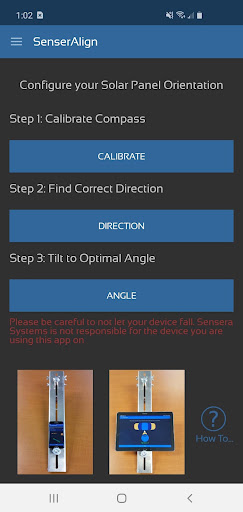
Simply place your device on the solar panel bracket and follow the onscreen instructions to best orient your solar panel.
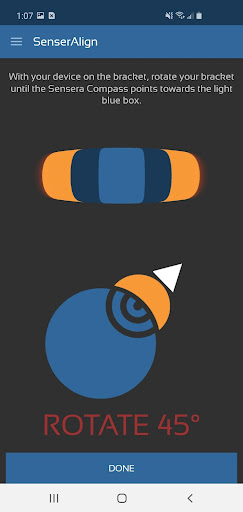
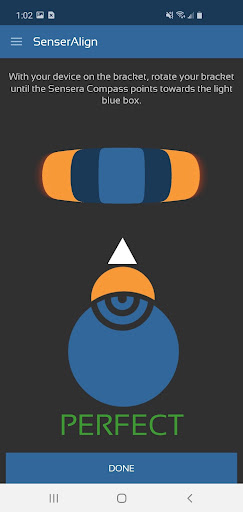
The Calibrate page helps with calibrating your compass sensors.The Direction page helps with pointing the solar panel in the optimal direction.
The Angle page helps with tilting the solar panel at the correct angle for how many times the solar panel will be adjusted throughout the year.
The different settings include:- 0 - 1 adjustments per year (Low efficiency)- 2 adjustments per year (adjusting every 6 months / Medium efficiency)- 4 adjustments per year (adjusting every 3 months / High efficiency)All calculations are based off location so enabling location permissions is highly necessary.
Simply place your device on the solar panel bracket and follow the onscreen instructions to best orient your solar panel.
The Calibrate page helps with calibrating your compass sensors.The Direction page helps with pointing the solar panel in the optimal direction.
The Angle page helps with tilting the solar panel at the correct angle for how many times the solar panel will be adjusted throughout the year.
The different settings include:- 0 - 1 adjustments per year (Low efficiency)- 2 adjustments per year (adjusting every 6 months / Medium efficiency)- 4 adjustments per year (adjusting every 3 months / High efficiency)All calculations are based off location so enabling location permissions is highly necessary.
Features
🏠
Smart Home
Control and monitor your home with smart features.
💬
24/7 Support
Our dedicated support team is always ready to help you.
⭐
Personalization
Customize the app to match your preferences and workflow.
Screenshots
See SenserAlign in Action
Get the App Today

Available for Android 8.0 and above
Ask AI about this app
Get instant answers about features, tips and more from popular AI assistants.